Fifty workers. Fifteen minutes each. Every day. At the 2026 national minimum wage floor, that adds up to about R7,500 a month in hours you paid for and got nothing in return, and that's ghost hours alone, before you count buddy punching, uncoded site time, or budget bleed you can't trace to a specific project. Running multiple construction sites compounds the problem because you're not just tracking hours, you're trying to know which site is draining your margin. The right time and attendance software doesn't just capture when workers arrive; it tells you exactly where your labour budget is going.
Feature 1: Project-Code Clocking Tells You Which Site Bled the Budget
Most clocking systems record a timestamp and a worker ID. That's the minimum. What multi-site construction businesses actually need is a system where every clock-in is tagged to a project code or site code at the moment of clocking, not added later by a supervisor who wasn't there.
The difference matters at payroll. Without project-code clocking, you might know that Sipho clocked 48 hours this week, but you have no verified record of how many of those hours belong to Site A versus Site B. That ambiguity costs you in two ways: you can't bill accurately against project budgets, and you can't spot which site is consistently over-hours without a site manager raising it manually.
Project-based time tracking closes that gap by making site or job code selection a required step at clock-in. Workers cannot record time without assigning it to a project. Every hour captured is immediately attributed to a cost centre, which means your multi-site labour cost visibility is built from verified data, not reconciled after the fact from paper timesheets.
For businesses running three or four concurrent sites, this is where the real financial control begins. When you pull a labour report at week's end, you can see cost-per-site in actual hours and rand value, not a blended total that hides where the margin problem lives.
Feature 2: GPS Verification Stops Buddy Punching Across Sites
Buddy punching is most common when the foreman is occupied elsewhere and no one is watching the gate. On a single-site operation, a few workers covering for each other is manageable. Across multiple sites, it scales silently and the payroll damage accumulates before anyone notices.
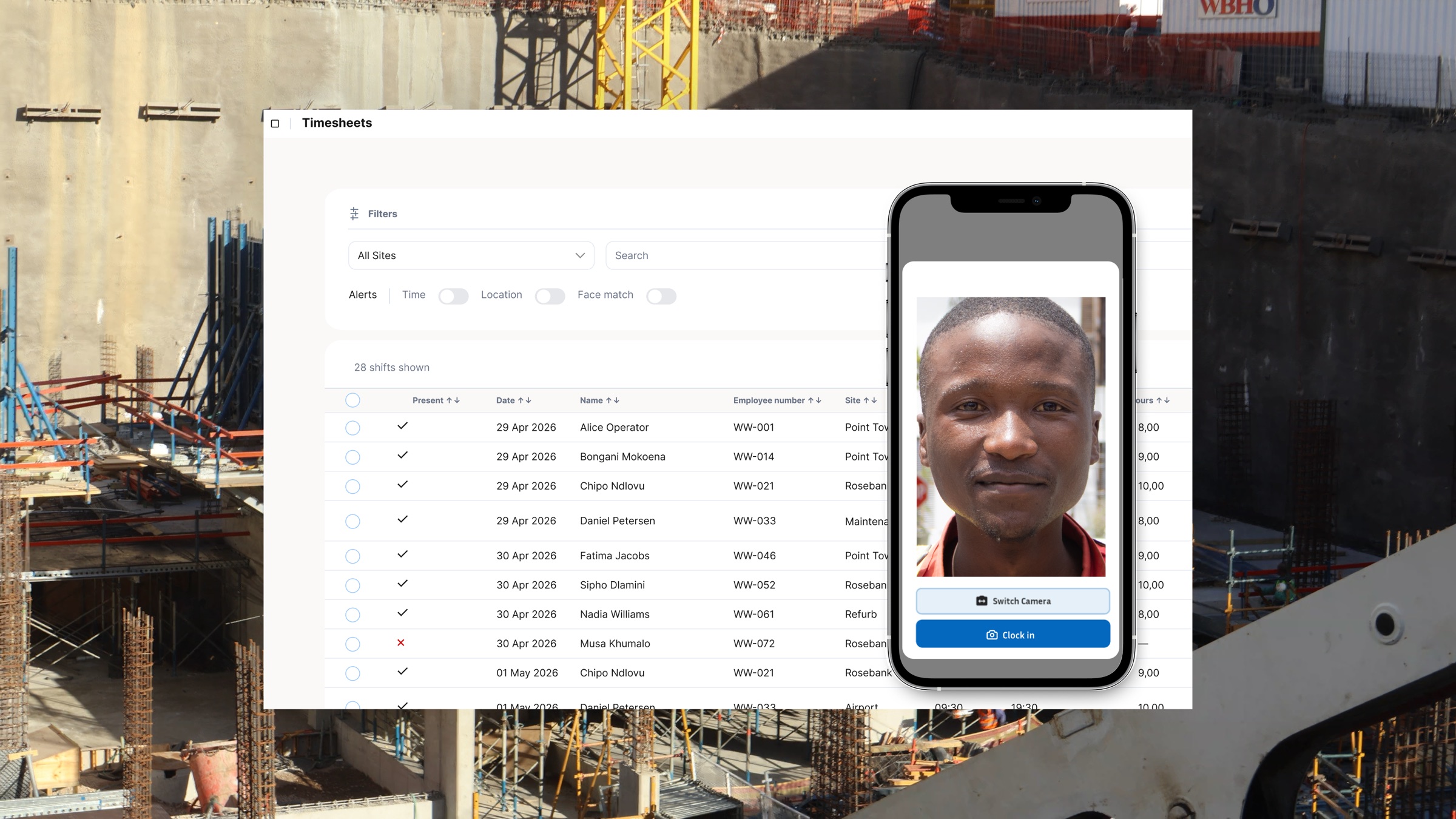
GPS verification works by capturing the device's coordinates at clock-in and checking them against the designated site boundary. If a worker clocks in from a different location, the system flags it immediately. That flag is recorded in the attendance log and visible to whoever manages payroll, rather than disappearing into a stack of paper timesheets.
The GPS clock-in verification approach also solves a specific multi-site problem: workers who are legitimately rotated between sites need to clock out of one project code and clock in under another. Without GPS-verified site boundaries, that rotation is invisible in your records, and labour costs blur across projects. With GPS, the transition is timestamped and location-confirmed.
It's worth understanding that GPS verification is not surveillance for its own sake. It's a payroll accuracy tool. When workers know that every clock-in is location-matched, the incentive to punch in early, punch out late, or clock a colleague in from the car park is removed, which protects your honest workers as much as it protects your budget.
Feature 3: Offline Mode Covers Remote Sites Where Signal Doesn't Reach
Some construction projects run in areas where mobile data is patchy at best and non-existent at worst. Civil works on the N2 outside Mthatha, pipeline jobs in the Northern Cape, substation construction in Mpumalanga, these are real site conditions, and a clocking system that requires a live internet connection is useless in all of them.
Offline mode means the clocking app stores records locally on the device when there is no connectivity. Workers clock in and out exactly as they would on a site with full signal. The records are written to the device and sync automatically when the tablet or phone reconnects to a network, with timestamps preserved from the moment of clock-in.
The critical detail here is that offline records must be tamper-resistant. A system that stores offline data in an editable format gives supervisors the ability to adjust records before they sync, which recreates the same ghost-hours risk you were trying to eliminate. Offline clocking only controls labour waste if the records are write-protected and sync with the original timestamps intact.
For businesses with a mix of urban and remote sites, offline mode is also what prevents you from running two parallel systems: a digital clocking system for connected sites and paper registers for remote ones. Paper registers create gaps in your audit trail, complicate your BCEA record-keeping obligations, and make CCMA disputes significantly harder to defend.
Feature 4: Real-Time Cost-Per-Site Dashboards Show the Bleed Before It Becomes a Loss
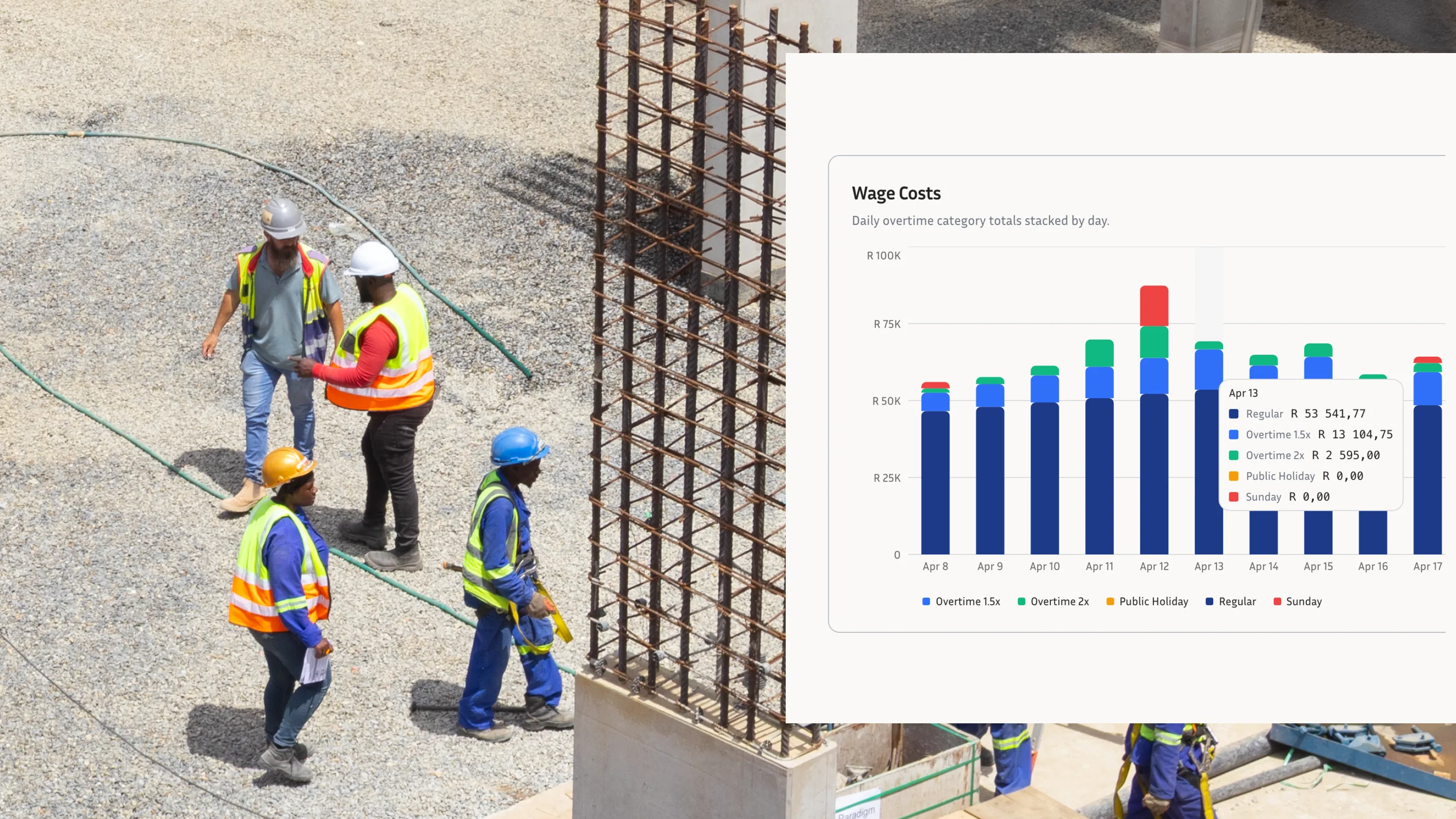
The monthly payroll report tells you what happened. A real-time labour cost dashboard tells you what is happening, which gives you the chance to act before a site blows its labour budget.
A dashboard that breaks down hours and costs by site in real time gives a site manager or ops manager one view across all active projects. You can see that Site B is trending 12% over its labour budget with two weeks left in the month. You can spot that Site C has workers clocking overtime on a day when the project schedule shows no reason for overtime. You can identify that Site A has four workers on the clock but no productive task assigned for the afternoon shift.
None of that is visible from paper timesheets or a weekly payroll run. Tracking hours by project or location in real time shifts the financial control from payroll administrator to site manager, where the actual labour decisions are made. The person who can act on a budget overrun is also the person who can see it.
For businesses managing four sites simultaneously, this visibility changes the nature of the operations conversation. Instead of discovering at month-end that a project ran R18,000 over on labour, the site manager gets the signal mid-month and can reallocate workers or adjust shift schedules before the loss is locked in.
Your 5-Feature Evaluation Checklist for Comparing Clocking Tools
When site managers are shortlisting a clocking system for employees on multi-site construction projects, the sales demos tend to focus on interface design and price. The questions that actually determine whether the system will cut labour waste are more specific. Before committing to any time tracking software for your South African construction business, run through this checklist.
1. Does every clock-in require a project or site code?
A system that allows workers to clock in without assigning a cost centre will give you attendance records but not project-level cost visibility. Confirm that project code is a mandatory step at clock-in, not an optional field added later.
2. Is GPS verification enforced at clock-in, or just logged?
Some systems record GPS coordinates passively without checking them against a defined site boundary. That gives you a coordinate in the log but no automatic flag when someone clocks in from the wrong location. Ask specifically whether the system enforces a geofence and what happens when a worker is outside the boundary.
3. Does offline mode write tamper-resistant records with original timestamps?
Ask the vendor what happens when a worker clocks in with no signal. Confirm that the record is written locally with the exact clock-in time, that the timestamp cannot be modified before syncing, and that the sync is automatic on reconnection.
4. Can you view labour cost per site in real time, not just at payroll?
Ask for a live demo of the reporting dashboard. If the system only shows reports after a payroll period closes, it does not give you the operational visibility to act on budget overruns mid-project.
5. Does the system produce payroll-ready exports?
Verified clocking data that must be re-keyed into a separate payroll platform is a manual step that introduces errors and costs admin time. Confirm whether the system produces payroll-ready exports for your payroll software, whether platforms like SimplePay and Sage can use the exported format, and whether the export maps correctly to your pay rules.
Any employee clocking system that cannot answer yes to all five of these questions will leave gaps in your labour cost control. The checklist is not a high bar, it describes the minimum a multi-site construction operation needs to stop the waste before it shows up in the monthly accounts.
Closing the R7,500 Gap
Ghost hours, buddy punching, and project misallocation are not unique to any one site or contractor. They are the predictable result of tracking systems that were designed for single-location, desk-based workforces and applied to construction without modification. The four features covered here, namely project-code clocking, GPS verification, offline mode, and real-time cost dashboards, address the specific conditions of multi-site construction work: dispersed crews, patchy connectivity, high worker turnover, and the need to attribute every labour rand to a specific project budget.
The R7,500 monthly loss on ghost hours alone across a 50-worker team is more than R90,000 a year, enough to fund a site supervisor, cover a month of equipment hire, or simply stay on the right side of a project margin. Getting that money back does not require a major infrastructure rollout. It requires a clocking system built for how construction sites actually operate.
If you want to see how WorkWeek handles project-code clocking, GPS verification, offline recording, and multi-site dashboards in a single platform built for South African conditions, book a demo and we will show you on your own crew size and site setup.