A stack of paper timesheets at the end of the week tells a site manager what workers wrote down, not what actually happened. On a construction site with 40 workers spread across three locations and a payroll run due Friday, the gap between those two things costs real money. Missing signatures, illegible start times, and timesheets that went through someone's washing machine are the routine, not the exception. This article breaks down what paper timesheets actually cost SA construction businesses and what changes when you move to a proper clocking system.
What Paper Timesheets Actually Cost You
The numbers are not abstract. If 50 workers round their start times forward or clock a colleague in while they park the bakkie, and each inflation averages 15 minutes per day across a five-day week, you are paying for roughly 250 hours of work every month that was never done. At the 2026 national minimum wage floor of R30.23 per ordinary hour, that is about R7,500 a month in wages with nothing to show for it. Across a year, the same crew costs you more than R90,000 in ghost time before a single legitimate overtime dispute lands on your desk.
Paper timesheets also create a hidden administration burden that rarely gets costed properly. Someone has to collect sheets, chase missing signatures, decipher handwriting, and re-enter figures into a spreadsheet or payroll system. For a medium-sized construction business, this often takes two to three hours per payroll run, and every manual re-entry step introduces the risk of a transposition error. One wrong hour figure can trigger an overpayment, an underpayment, or a dispute with a worker who has every right to question the number.
The problem compounds on multi-site operations. When workers move between sites mid-week, paper timesheets rarely capture which site the hours belong to. That makes project costing guesswork: your labour spend against Site A looks clean on paper, but some of those hours were actually worked on Site B. A timesheet app that records the clock-in location automatically solves this at zero extra effort from the site manager.
Then there is buddy punching. A worker clocking in for a friend who is running late is so common on South African construction sites that many managers have stopped trying to catch it through paper. The signature looks the same, the handwriting is similar enough, and without a photo or GPS pin at the moment of clock-in, there is no evidence either way. Buddy punching on construction sites is a well-documented payroll fraud risk that paper simply cannot address.
The Compliance Problem Paper Timesheets Create
The Basic Conditions of Employment Act requires employers to keep accurate records of hours worked, overtime, and leave for each employee for a minimum of three years. Paper timesheets satisfy this requirement in theory. In practice, they rarely hold up under scrutiny, because there is no verified chain of custody between a worker signing a sheet and the hours that appear on the payroll run.
When a CCMA dispute lands, the burden of proof sits with the employer. If a worker claims they worked 12 hours on a Sunday and were paid at the wrong premium rate, you need records that show exactly when they arrived and when they left, verified by something stronger than a signature on a sheet they may have filled in themselves. A paper timesheet produced three months after the fact, with a scrawled note in the margin, does not inspire confidence at a conciliation hearing. Verified digital clocking records, timestamped and GPS-confirmed at the moment of clock-in, are a different category of evidence entirely.
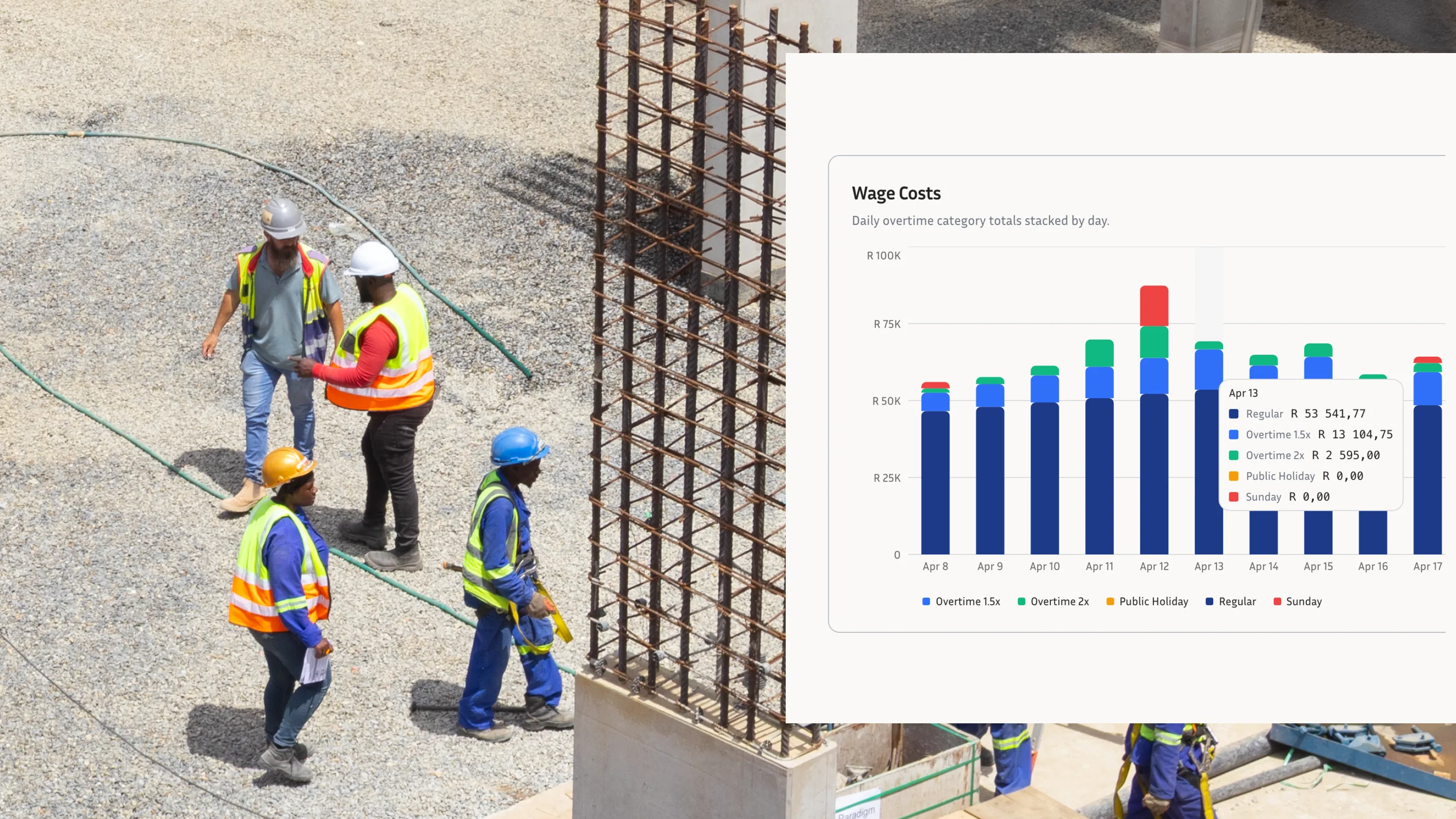
Overtime calculations are where paper timesheets create the most expensive compliance errors. For workers covered by the BCEA working-time rules, ordinary hours are generally capped at 45 per week, overtime is paid at least 1.5x, and Sunday work attracts its own 2x or 1.5x rules depending on whether Sunday is an ordinary working day. When your time data comes from paper, calculating these thresholds accurately across a crew of 30 workers, some of whom came in on Saturday and two of whom are approaching the weekly overtime cap, is manual work that goes wrong regularly. The BCEA overtime calculation is not complicated once the hour data is clean; the problem is that paper rarely produces clean hour data.
Leave records suffer the same way. A worker takes two days off, a foreman notes it somewhere, and by the time the leave reaches payroll it has been rewritten twice. Annual leave balances drift, pro-rata calculations at project end get contested, and the employer has no reliable audit trail. A proper time and attendance software system captures leave alongside clock-in data and keeps a running balance that both the worker and the manager can see.
What a Digital Employee Clocking System Actually Does
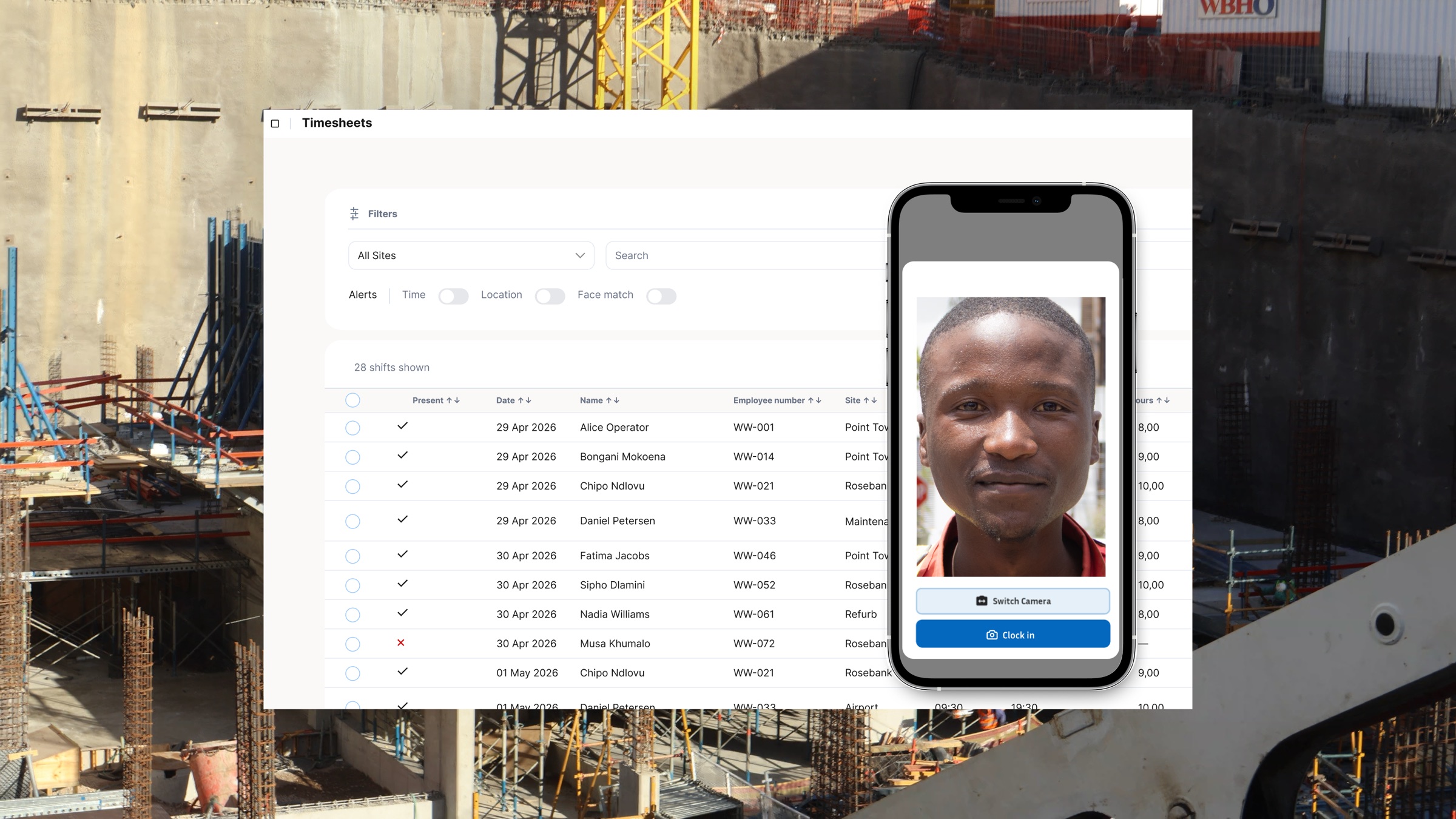
A digital employee clocking system replaces the paper sheet with a verified, timestamped record at the moment of clock-in. The worker picks up a supervisor's phone or uses a site tablet, takes a quick selfie that gets matched against their stored profile, and the record is written. No signature required, no re-entry later, no ambiguity about who clocked in or from where.
GPS geofencing adds a location layer. When a worker clocks in from outside the defined site boundary, the system flags it immediately rather than letting the error propagate through to payroll. For construction businesses with remote sites or workers spread across a large yard, this is the difference between knowing where your labour is and hoping the paperwork reflects reality. On data-scarce sites where connectivity is unreliable, an offline-first system writes the record locally and syncs when the signal returns, so there is no gap in the attendance log.
The identity verification piece matters more than most site managers initially realise. Facial clocking, where the worker's selfie at clock-in is matched against their registered profile, is the direct replacement for biometric hardware without the cost or maintenance overhead of fingerprint readers bolted to a site entrance. Unlike a paper signature, a matched photo is evidence. Unlike a fingerprint reader, it works on a standard Android phone in the middle of a dusty site with no electricity outlet nearby.
For payroll, the shift from paper to a clocking system for employees means the hours are already structured and accurate by the time payroll runs. Overtime thresholds are calculated automatically: when a worker crosses 45 ordinary hours, the system flags the rate change. Sunday hours and public holiday premiums are applied based on the actual timestamp, not based on what a foreman recalled when filling in the weekly sheet. The export to payroll software, whether that is SimplePay, Sage, or another platform, is clean data rather than a transcribed approximation.
Why the Timesheet App Argument Misses the Point
Some businesses try to split the difference: workers fill in a digital timesheet on their phone instead of a paper one. This solves the handwriting and re-entry problems, but it does not solve the verification problem. A worker can fill in a timesheet app from anywhere, at any time, with any hours they choose to enter. Without a GPS pin, a matched facial scan, or a supervisor-controlled clock-in, you have replaced paper fraud with digital fraud.
The distinction is worth being precise about. A timesheet app where workers self-report hours is a digital version of the same underlying problem. A clocking system for employees that requires a verified identity check and GPS confirmation at the moment of clock-in is a fundamentally different category of tool. One produces data that could be fabricated; the other produces records that are difficult to forge and carry weight as evidence in a payroll dispute.
This is why the comparison is not really paper versus digital. It is verified attendance data versus unverified attendance data, and the employee clocking system you choose determines which side of that line your business operates on.
Multi-site businesses feel this most acutely. When a manager is not physically present at every gate on every site, paper timesheets and self-report apps put them in the position of trusting everyone without any ability to verify. A digital clocking system with multi-site visibility means the manager sees every clock-in and clock-out across all sites in real time, with the worker's photo attached to each record. Labour reallocation between sites gets tracked automatically, not reconstructed from memory at the end of the week.
Making the Switch: What to Look For in a Clocking System
Not every digital clocking solution is built for South African construction conditions. The three non-negotiable requirements for a site-based workforce are: offline functionality (sites lose signal and load-shedding happens), data-free or low-data operation (workers should not be burning their own data to clock in), and verified identity at clock-in (a GPS pin without a photo is only half the verification).
BCEA compliance automation is the fourth requirement that separates a capable clocking system from a basic attendance tool. The system should calculate the 45-hour ordinary threshold, apply the relevant overtime and Sunday-work rates automatically, flag public holiday hours for review, and produce records that support the BCEA Section 31 record-keeping standard. Doing this manually from clean digital data is still manual work; the right time and attendance software handles it automatically.
Payroll handoff matters too. Clean clock-in data that has to be manually re-entered into payroll still carries re-entry risk. An employee clocking system that produces payroll-ready exports for tools such as SimplePay or Sage closes the last gap between verified attendance and accurate payslips without overstating the integration layer.
The onboarding process is worth checking before you commit to a platform. A system that takes 20 minutes per worker to set up is a barrier on a high-turnover site where you may be adding new workers every week. Registration should take under two minutes per worker, including the facial profile capture, and it should be possible to complete on a smartphone without a laptop, a printer, or a stable internet connection.
The Bottom Line on Paper Timesheets
Paper timesheets are not a zero-cost option. They carry a cost in payroll errors, a cost in compliance risk, a cost in ghost time and buddy punching, and a cost in the administrative hours spent chasing and transcribing them. Those costs are mostly invisible on the ledger because they appear as slightly inflated payroll rather than as a line item called "paper timesheet losses."
A digital clocking system makes those costs visible and then removes them. Verified attendance data means the payroll figures match what actually happened on site. BCEA overtime calculations are accurate and documented. Leave balances stay current. When a CCMA dispute arises, the records stand up in a way that paper never could.
If your construction business is still running on paper, or on a self-report timesheet app that offers no identity verification, the cost of staying there is higher than the cost of switching. Book a demo with the WorkWeek team to see how a site-ready clocking system works in practice.